


Buildium price and terms
Terms
- Free to start
- PartlyPartly14-day free trial, no credit card, on sample data only
The terms in full
it converts to Essential, Growth or Premium and there is no standing free plan
- Sign up without sales
- YesYes
What needs a higher plan
- Essential
- Cost for 25 units a month
- Growth
- Cost for 50 units a month, Support
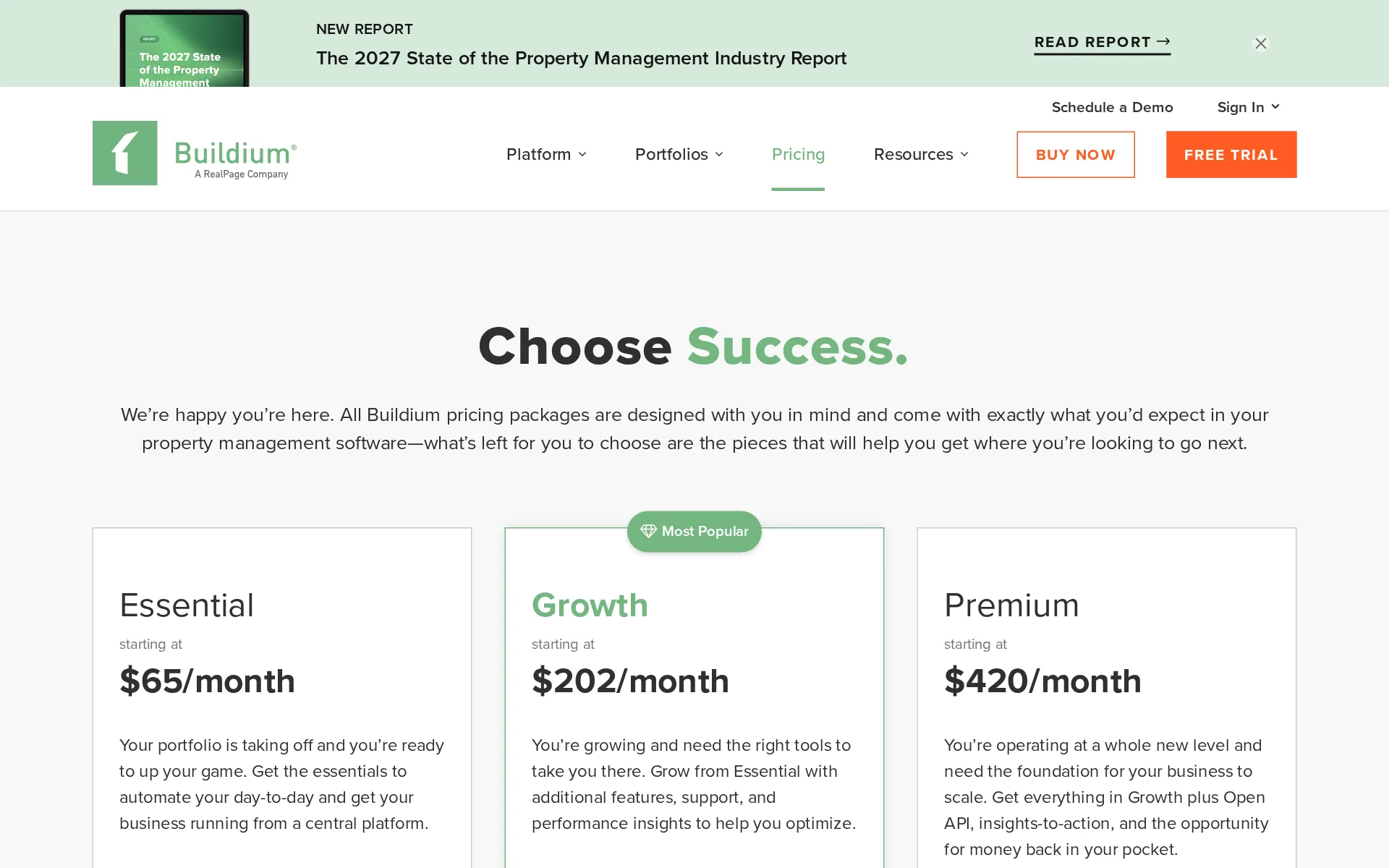
Pricing page, captured
buildium.com/pricing, checked
What we checked on Buildium
Cost for 25 units a month
$142.75 a month on Essential (21-40 units) for 25 units. Every unit counts, vacant or let, unless the vendor bills only occupied units. Essential (1-20 units) ($123.75) includes 20 units; these units need 25, and past the allowance you are moved to the next plan. Charged per unit: 25 × $2.35 (rent payment by bank transfer). Plus a one-time setup fee of $99, not included.
Starting Price $84/mo
buildium.com/pricingChecked
Cost for 5 units a month
$76.75 a month on Essential (1-20 units) for 5 units. Every unit counts, vacant or let, unless the vendor bills only occupied units. Charged per unit: 5 × $2.35 (rent payment by bank transfer). Plus a one-time setup fee of $99, not included.
Starting Price $65/mo
buildium.com/pricingChecked
Cost for 50 units a month
$269.50 a month on Growth (1-50 units) for 50 units. Every unit counts, vacant or let, unless the vendor bills only occupied units. Essential (1-20 units) ($182.50) includes 20 units; these units need 50, and past the allowance you are moved to the next plan. Essential (21-40 units) ($201.50) includes 40 units; these units need 50, and past the allowance you are moved to the next plan. Charged per unit: 50 × $1.35 (rent payment by bank transfer).
Starting Price $202/mo
buildium.com/pricingChecked
What the price is based on
Price is set in unit bands, not per unit or flat: the vendor's calculator holds Essential at $65 up to 20 units and $84 from 21 to 40, and lifts Growth from $202 to $265 past 50 units.
How many units do you manage in your portfolio?
buildium.com/pricingChecked
Rent payment fees
Each incoming bank transfer costs $2.35 on Essential, $1.35 on Growth and $0.60 on Premium after a free first year, and card payments cost 2.99%; these are billed as subscription fees, not charged to residents.
On the page: Customize Your Subscription, ePay for Online Payments card
buildium.com/pricingChecked
Minimum units or minimum fee
No minimum unit count is sold against: the calculator prices a single unit, though that one unit still pays the full $65 Essential floor because the first band runs to 20 units.
On the page: Calculate Your Price calculator, Essential selected, unit count set to 1
buildium.com/pricingChecked
Unit caps
Essential is sold only up to 40 units, and inside the plans the price steps at band edges, so one more unit past 20, 40 or 50 moves a landlord up a band or a plan.
Essential Up to 40 Units
buildium.com/pricingChecked
Promotion and regular price
none: the three figures on the plan cards are regular monthly prices, with the yearly rate behind a separate control and no dated offer anywhere on the page.
starting at $65/month
buildium.com/pricingChecked
Setup or onboarding fee
One-time charges exist but not a single implementation fee: $99 per business bank account on Essential, $99 to start inspections there, $30 for check printing, plus compulsory onboarding on Growth and Premium with no price published.
All new Buildium customers purchasing our Growth or Premium plan must use our customized Onboarding service to get started with Buildium.
buildium.com/pricingChecked
Listing your vacancy
One click puts a vacancy on the named rental sites and on the manager's own marketing website, and the row is included on all three plans rather than sold as an extra.
Post to your website and syndicate rental listings to Apartments.com, Apartment List, the entire Zillow Rental Network, Zumper, and even Craigslist
Online applications
Applicants apply straight from the listing page and pay whatever fee the manager sets online; the vendor charges nothing for the form itself and bills the screening report separately.
Any related application fees are attached to their account and can be paid online.
Tenant screening
Reports come from TransUnion at $17 each, or $35 when the cost is passed to the applicant, with a $20 enhanced report on the upper plans; the table marks screening an add-on on every plan, never included.
With Buildium, Tenant Screening costs $17 per screen (or $35 per screen if you pass the cost to the applicant) and Enhanced Tenant Screening is $20…
Showings
Self-booking exists but costs extra on the entry plan: the Tenant Turner add-on starts at $41 a month plus a $25 Essential setup fee, and the built-in tour scheduling row is marked for Premium alone.
$25 set-up fee in Essentials plan Set-up fee waived for Growth and Premium plan.
buildium.com/pricingChecked
Leases signed online
Leases are built from reusable templates with autofill fields and signed online through Dropbox Sign, charged per document on the lower plans and bundled on Premium.
Set up flexible templates tailored to your business for all lease documents and addenda.
Rent collected online
Residents add a bank account or card in the portal and set recurring payments, with money moved to the manager's bank automatically; how many days a bank transfer takes to land is not published.
Funds are automatically transferred to your bank account—no manual deposits necessary.
Autopay and reminders
Residents set recurring payments themselves, and the plan table lists resident payment reminders as an automation included on all three plans rather than an extra.
Autopay and payment reminders make it easy to pay on time through the Resident Center app
Late fees
Yes, posted automatically by your rules. Late fee policies post fees automatically: daily or one-time, as a flat amount or a percentage, with a grace period per charge, tiered fees and weekly to monthly cycles.
Flexible control: unlimited rules, grace periods up to 365 days, customizable memos, and the ability to apply multiple rules in bulk.
Partial payments
Yes, you can block partial online payments. A setting requires every online payment to cover the current balance; it applies to all leases in the account.
Buildium allows you to require that all online payments be equal to or greater than the current balance owed for a lease or ownership account at the…
Security deposits
Deposits are collected and carried in the books beside rent, and a deposit-free alternative through Obligo is offered to residents on every plan as well.
Manage incoming rent and security deposits, collect and automate fees, and pay bills online easily.
Rent paid in cash
Residents can pay cash at PayNearMe shops with a payslip or phone code and it posts automatically, but the vendor publishes no fee for the service nor who carries it.
Retail Cash Payments, powered by PayNearMe, makes it simple for residents to make cash rent payments at over 20,000 trusted locations nationwide.
Rent reported to credit bureaus
On-time rent can be reported to one or more major bureaus, included on all three plans, and the vendor frames it as something residents choose and pay for themselves.
Make it easy and affordable for residents to build their credit history by reporting on-time, monthly rent payment activity to one or more of the…
Maintenance requests
Residents submit and follow requests in the portal while work orders, vendors and updates sit in one queue for the manager; whether a photo can be attached is not stated.
Tasks, work orders, vendors, and repair updates all live in one place, so you can see exactly where everything stands.
Work orders to contractors
A work order can be turned into a bill and paid out electronically or by posted cheque, and work order management is included on all three plans.
Change work orders into bills, then pay them online—and, set up automatic payments for recurring items.
Move-in and move-out inspections
Inspections come from HappyCo and cost extra on the entry plan, $99 to set up plus $40 to $95 a month, included on Growth and Premium; sharing a report with a resident is not described.
Essential $99 setup fee. $40-$95 monthly fee. Growth All fees Included. *After 3 years, $0.40 per unit.
buildium.com/pricingChecked
Income and expenses by property
Each property carries its own ledger and chart of accounts with a reporting suite behind it, and financial reporting with standard reports is included on every plan.
It helps bookkeeping stay complete and accurate with a fully featured financial transaction ledger, customizable chart of accounts, and comprehensive…
Schedule E report
No; Buildium says to use the income statement. Buildium does not produce a Schedule E report.
If you're looking for information on a Schedule C, Schedule E or IRS Form 1065 and Schedule K-1, Buildium does not provide these forms, but you can…
Bank sync
Yes: bank feed with automatic matching, on all plans. Automatic bank reconciliation connects to your bank, downloads cleared transactions a few times a day and matches them to entries in Buildium.
The automatic bank reconciliation feature simplifies the process, by downloading recently cleared bank transactions from the "real world" bank and…
A bank account per property
Several business bank accounts are supported and priced: each costs $99 to set up on Essential, while Growth includes ten and Premium a hundred before the same $99 applies.
Essential: $99 per business bank account Growth: 10 free business bank accounts; $99 per additional bank account Premium: 100 free business bank…
buildium.com/pricingChecked
1099s
Forms for both owners and contractors are filed electronically through Nelco from the payment records already in the books, charged $50 a batch plus $4.50 a form.
Generate 1099s online in minutes for both property owners and vendors. $50 per batch + $4.50 per form
buildium.com/pricingChecked
QuickBooks
QuickBooks Online: no sync. No page read names a QuickBooks Online connection; Buildium presents its own books as the alternative.
If you track your company finances in an outside accounting system like QuickBooks, this export creates a ready‑to‑import journal entry file that…
Receipts
Bills are captured by emailing or uploading invoices, which the AI reads into a bill, but photographing a receipt in the field is not described, and it costs extra below Premium.
Just email or upload your stack of invoices. AI Bill Scan pulls the key info, builds the bill, and cuts hours of manual entry down to a few clicks.
Owner portal and statements
Owners get a branded portal and mobile app of their own with live financial reports, documents and funding requests, and the row is included on all three plans.
Share reports, manage payments, communicate updates, and store documents in one easy-to-use, fully branded portal
Trust accounting
Owners' and residents' money sits in separate business bank accounts, reconciled automatically against statements, with a report suite the vendor ties to trust accounting duties.
Take advantage of our full suite of reports to ensure you're following trust accounting rules.
Management fees
Built-in calculators work out what is owed to the manager's own company, to owners and to contractors, and owners are paid electronically or by cheque; no fee rule or percentage setting is named.
Built-in calculators show you what you owe your company, property owners, and vendors.
Team users
Staff log in under roles and permissions the company shapes itself, included on all three plans, and no per-user charge appears anywhere on the rate card.
Customized User Roles and Permissions
buildium.com/pricingChecked
Tenant app
Residents get a portal and mobile app for paying, messaging and raising requests, branded to the manager and included on every plan.
24/7 online access to the most important services including paying fees or rent, submitting and tracking maintenance requests, and staying in sync…
Renters insurance
Policy details from any insurer sync back automatically so cover can be tracked, and a $12 policy is sold in the portal; the vendor does not say cover can be made compulsory.
Regardless of whether residents have purchased Buildium Renters Insurance or a different provider, policy information is automatically synced to your…
AI features
In the vendor's words it automates billing, communications, leasing, maintenance and reporting, with named agents, invoice reading and drafting help; the full set sits on Premium.
Lumina AI is Buildium's intelligent automation suite built specifically for property management. It automates billing, communications, leasing,…
Free plan or trial
There is no standing free plan, only a two-week trial on sample data, so the cheapest way in is the $65 Essential subscription plus the fee on each payment.
When you sign up for a free 14-day trial you'll be able to use sample data to see how Buildium handles your real-world tasks.
buildium.com/pricingChecked
Sign up without a sales call
A buyer starts the trial in half a minute without a card and can buy online, though onboarding is compulsory on the upper plans and association or 5,000-unit pricing goes through a phone call.
It takes just 30 seconds. No credit card required.
buildium.com/pricingChecked
Contract and cancelling
Terms run monthly or annually and renew by themselves unless written notice lands 30 days before the end; an annual term is paid up front and cancelling early brings no refund.
unless either Buildium or Owner provides written notice of termination at least 30 days prior to the end of the then-current License Term
buildium.com/terms-of-useChecked
Support
Everyone gets email tickets and the knowledge base, but a person on the phone starts at Growth, weekdays 9am to 8pm Eastern, and the fast queue is an extra there and included only on Premium.
Live Phone Support is provided for customers who purchase a Growth or Premium plan.
buildium.com/pricingChecked
Getting your data out
Spreadsheet exports and reports; not every ledger exports. Settings > Export Data downloads spreadsheets for rentals, associations, accounting, tasks and communication, and every report runs as a spreadsheet, but Buildium says it does not export all ledger financials.
Though Buildium does not provide export files for all ledger financials, if you need to export some financial data, it's just a few clicks away.
Property types
The vendor names single-family, multifamily, student housing, mixed-use, commercial, community associations and large multi-entity portfolios as the kinds it is built for.
Made for mixed portfolios
buildium.comChecked
Still sold
live: the vendor sells to new customers today through an online trial and a buy-now path, and publishes a 2027 industry report dated this month.
Start your free trial today
buildium.comChecked
Buildium alternatives
All 9 alternatives6 more alternatives
7 of the 9 publish a price.
- DoorLoopFrom $239 a monthAI agents answer tenants, run repairs and renewals inside the same system holding your leases and books.
- Yardi BreezeFrom $100 a monthCloud property management software from Yardi for small and mid-sized residential and commercial portfolios.
- HemlaneFree, then $36.50 a monthRental management software with optional 24/7 repair coordination and leasing help, priced per unit.
- ManageCasaFrom $51.14 a monthAll-in-one platform for HOAs, rental portfolios and marinas, priced in unit tiers.


Sources and changes
Last changed
Sources34
- buildium.com/pricing
- buildium.com/features/property-management-accounting
- buildium.com/
- buildium.com/features/ai-property-management-software
- buildium.com/features/online-rent-payments
- buildium.com/features/property-management-maintenance-software
- buildium.com/features/resident-center
- help.buildium.com/hc/s/article/ePay-BasicS
- buildium.com/blog/best-commercial-property-management-software
- buildium.com/blog/best-property-management-software-for-small-landlords
- buildium.com/features/1099-efiling
- buildium.com/features/company-financials
- buildium.com/features/msi-renters-insurance
- buildium.com/features/online-leasing
- buildium.com/features/online-rental-applications
- buildium.com/features/property-owner-portal
- buildium.com/features/rental-listing-syndication
- buildium.com/features/renters-insurance
- buildium.com/features/retail-cash-payments
- buildium.com/features/tenant-background-checks
- help.buildium.com/hc/s/article/1099-MISC-tax-filings-1557494401772
- help.buildium.com/hc/s/article/Automatic-bank-reconciliation
- help.buildium.com/hc/s/article/Customize-Late-Fees
- help.buildium.com/hc/s/article/Export-data-from-Buildium-1557494404392
- help.buildium.com/hc/s/article/Export-Management-Income
- help.buildium.com/hc/s/article/Getting-started-with-ePay
- help.buildium.com/hc/s/article/How-do-I-add-a-lease-1557495014686
- help.buildium.com/hc/s/article/How-do-I-cancel-my-Buildium-account-1557492525600
- help.buildium.com/hc/s/article/How-do-I-set-my-management-fee-policy-1557495014740
- help.buildium.com/hc/s/article/Income-statement-detailed-report-1557495467075
- help.buildium.com/hc/s/article/Trust-accounting-Who-owns-the-money-1557494407494
- residentcenter.com/rent-reportingIndependent source
- residentcenter.com/resident-center-mobile-help-centerIndependent source
- buildium.com/terms-of-use
Is this yours?
Own this product? Claim the page free to see who reads it and show it is yours. You confirm it with an email at buildium.com.
Report an error if a fact is wrong.